Most AI products share the same frustrating problem. The technology works, the results are real, and the buyer still leaves unconvinced. Nothing broke. The demo ran fine. The prospect just never got a clear picture of what the thing does for them on a Tuesday afternoon.
Closing that gap is the job of AI explainer videos, and it’s harder than what a normal software video has to do. Sell a project management tool, and you can point at a screen while a task slides between columns. Cause, then effect. Sell an AI product and the interesting part happens where the buyer can’t look, and they’ve been oversold enough times to assume the worst.
Key Takeaways
- Artificial intelligence (AI) products are hard to sell because the work happens where nobody can see it, so the video has to manufacture visible proof.
- Buyers move through four questions in order: what changes for me, did it really do that, why should I believe it, and what happens when it’s wrong.
- Outcome comes first. Mechanism comes second, and only enough to make the outcome believable.
- Technical evaluators and economic buyers check for different failure modes, which usually means two assets rather than one catch-all film.
- Screen recordings prove capability while motion graphics explain the invisible middle. Most strong AI explainer videos use both.
- Overclaiming what a model can do is now a regulatory exposure, not just a credibility problem.
Why AI Products Break the Normal Rules of Product Marketing
AI products break the normal rules because the thing you’re selling never appears on screen. There’s an input, a pause, and an output. The value lives inside that pause, and no camera can film it.
Three pressures stack on top.
Buyers are skeptical by default. After years of nearly every product rebranding itself as intelligent, purchasing teams discount AI claims before they finish reading them. Research from KPMG and the University of Queensland found that fewer than half of people across 47 countries are willing to trust AI systems, and that skepticism walks into your sales calls with them.
They also can’t tell a serious system from a thin wrapper around someone else’s model. Two products make identical claims, and only one holds up under load.
The vocabulary keeps moving too, so your video has to teach before it can persuade.
What Does a Buyer Actually Need to See Before They Trust an AI Tool?
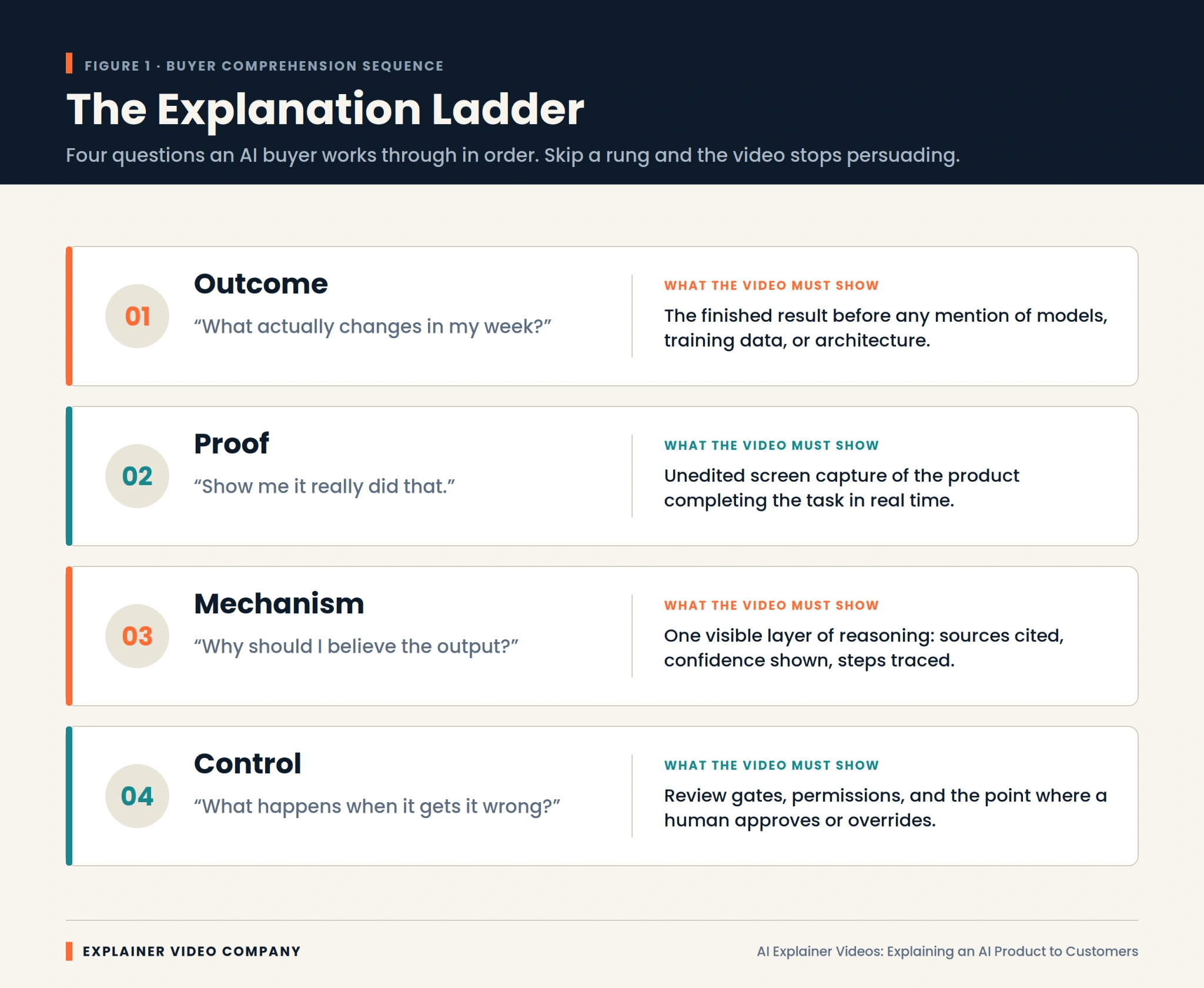
They need four things, and the order matters more than the content. Buyers climb these rungs one at a time, and a video that skips one stops working there.
Outcome. What actually changes in my week? The finished result, stated before any mention of models or architecture.
Proof. Show me it really did that. Unedited screen capture of the product finishing the task, without cuts hiding the slow parts.
Mechanism. Why should I believe the output? One visible layer of reasoning, such as sources cited or steps traced.
Control. What happens when it gets it wrong? Review gates, permissions, and the moment a human approves or overrides it.
Weak AI explainer videos nearly always fail at rung two. They assert the outcome with confident narration, then jump to a feature list. The buyer never saw it work, so nothing after that lands.
Lead With the Outcome, Then Earn the Right to Explain the Mechanism
Start with the result, because it’s the only part your buyer can evaluate without help. Anything technical you lead with is noise they have no framework for.
The practical version: open on the broken process your buyer already lives with, show the output your product produces, then spend a short stretch on how it gets there. That mechanism section isn’t there to educate. It’s there to make the outcome credible. Once it’s done that, stop.
Technical and Non-Technical Buyers Need Two Different Videos
These audiences need different footage because they check for different failure modes. Simplify too far, and your engineering evaluator assumes you’re hiding something. Go too deep, and your economic buyer stops paying attention.
Operations leads, marketing heads, and executives want the before-and-after, plus reassurance that adoption won’t cost them a quarter. Analogy helps. Jargon hurts. If you’ve wrestled with how to explain AI to non-technical people, the fix is almost always to describe the job it finishes, not the method.
Technical buyers want the opposite: the real product on a real task, with data flow, permissions, and error handling visible. Polish makes them suspicious.
Serving both in one film satisfies neither. A short outcome video plus a longer technical walkthrough performs better, which is how our SaaS explainer video services are usually structured.
How Do the Best AI Companies Explain Themselves on Screen?
Companies that explain AI well share one habit: they show real output instead of describing it. Studying strong AI explainer video examples is worth an hour before you write any script.
Perplexity built its storytelling around citations appearing beside answers. That isn’t a feature demo. It’s a visual answer to the biggest objection anyone has about AI.
Cursor demos inside a real code editor, for an audience that would instantly spot a staged environment. For developers, the demo is the pitch.
Notion embedded its AI features into an interface people already knew, which removed the new-scary-thing reaction entirely.
Glean and Harvey lean hardest on permissions and domain accuracy, because their buyers purchase governance as much as capability.
One pattern across all four. Show the thing working, and answer the biggest doubt inside the demo rather than after it.
Screen Recordings Prove Capability, Animation Explains the Invisible
Use screen recording for anything the product visibly completes, and animation for what happens between the click and the result. Choosing wrongly is the most common production mistake we see.
Screen capture is unbeatable for proof. Real interface, real latency, real output. For agentic tools chaining several steps, watching the sequence unfold persuades better than any voiceover.
Animation earns its place when there’s nothing to film. Retrieval, ranking, and confidence scoring have no natural visual form, so one has to be built. That’s the honest answer to how to explain a black box AI.
You don’t open the box. You draw a truthful diagram of what goes in, what comes out, and what the system checks on the way. Good 2D explainer video services turn that abstraction into a flow the eye follows in seconds.
One caution: animate the parts you could have filmed, and viewers assume the real product isn’t ready.
Hardware and Edge AI Need a Different Visual Treatment
Physical AI products need dimensional treatment because the story involves components, placement, and physics that flat graphics flatten out. A vision system on a production line or a chip inside a sealed device involves spatial relationships a viewer needs to see from several angles.
This is where 3D explainer video services do work nothing else can. Cutaways reveal a sensor array inside a housing. Camera moves show how a device perceives the space around it. The AI product animation puts an invisible processing layer inside an object the buyer will actually install.
Software-only teams rarely need this, and it’s worth saying so rather than buying dimensionality you won’t use. For products sitting in between, our breakdown of 2D vs 3D explainer videos covers where each approach stops being worth the investment.
What Should You Cut From an AI Product Video?
Cut the model architecture, the funding announcement, the founder origin story, and every adjective you can’t demonstrate. Most first drafts run forty percent long, and the excess is self-description.
Specifically, cut these:
- Model names and parameter counts, unless you’re selling to machine learning engineers
- Any claim of full autonomy your product doesn’t literally deliver
- Stock footage of glowing brains, circuit boards, and blue particle grids
- Competing calls to action at the end, which cancel each other out
- Feature lists arriving before the viewer understands the outcome
Cutting early protects budget too, since scope drives production spend more than anything. Our guide to explainer video cost breaks down where the money goes.
The question of how to demo an AI product answers itself once you’ve deleted everything that isn’t the demo.
Overclaiming Is Now a Legal Risk, Not Just a Credibility Risk
Capability claims now carry regulatory exposure, which changes how scripts get written.
In September 2024, the United States Federal Trade Commission (FTC) announced Operation AI Comply, a sweep of five enforcement actions against deceptive AI claims. Securities regulators separately charged investment advisers for overstating how much AI their systems used, and the European Union AI Act introduced transparency obligations covering disclosure when people interact with an AI system.
For anyone working out how to market an AI product, the takeaway is simple. A video that demonstrates is safe. A video that asserts is exposed.
Write claims you could defend with a recording. If your product needs human review before it acts, show that step instead of editing around it. Accuracy framed honestly reads as confidence, not weakness.
A 90-Second Spine That Survives a Skeptical Viewer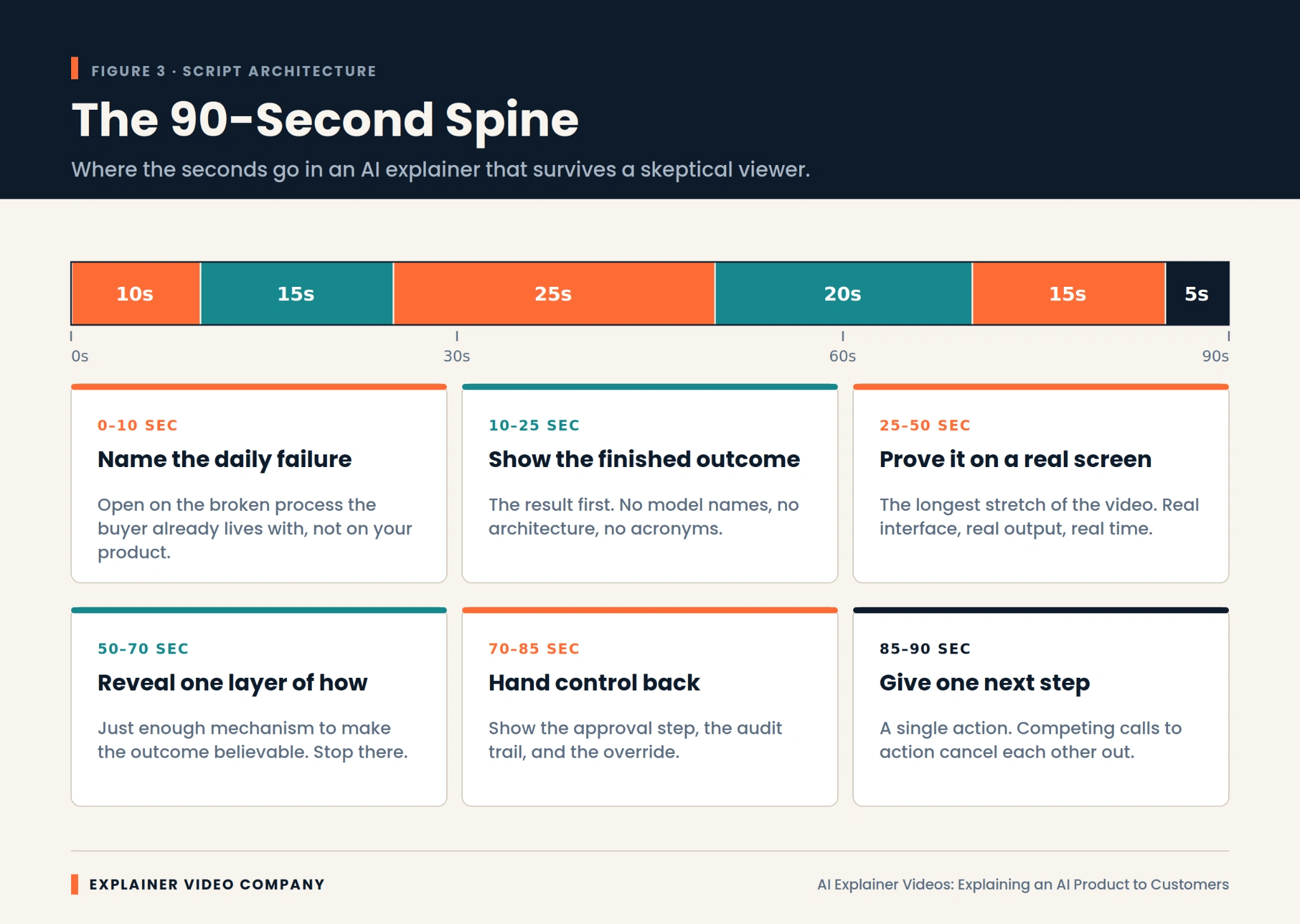
Ninety seconds is plenty if they’re allocated properly. This structure holds up against a viewer who arrived expecting to be oversold.
Spend the first ten seconds naming the daily failure your buyer already recognizes. Not your product. Their broken process.
Give the next fifteen to the finished outcome, with no model names and no acronyms.
Hand the following twenty-five, the longest stretch, to a real screen capture of the product working.
Use the next twenty to reveal one layer of mechanism, and only one.
Spend fifteen on where human control sits, then close with five seconds and exactly one next step.
Among AI product demo best practices, that proportion is what most teams get wrong. In the strongest AI explainer videos, proof is the longest section, and in a first draft it almost never is.
Measure Comprehension, Not View Count
Track whether people understood the product, because view count says nothing about whether the explanation worked. Strong views with weak comprehension are an expensive way to confuse people faster.
Three signals matter. Drop-off timing, since a cliff around twenty seconds usually means the outcome wasn’t clear. The questions arriving in sales calls, because effective AI explainer videos visibly change what prospects ask about. And demo-request quality, which improves as unqualified viewers self-select out earlier. Your sales team will tell you within two weeks whether it’s working.
When evaluating production partners, ask how they measure comprehension rather than reach. It’s one of the more revealing questions covered in our guide on choosing the best explainer video company.
Final Words
A clear explanation compounds. Once a prospect understands what your AI does and why its output can be trusted, every downstream conversation gets shorter, and your team stops re-explaining the same concept.
The work is mostly discipline. Outcome before mechanism. Capability proved with real footage. One layer of how it works, no more. Human control made visible. Claims limited to what you can demonstrate on screen.
Explainer Video Company builds AI explainer videos around that sequence, matching format to what needs to be believed rather than to whatever looks impressive. If your product is stronger than your buyers currently realize, working with an experienced explainer video production company is the fastest way to close that gap.
