Micro-Learning Videos Under 60 Seconds: A How-to-Make Guide
2026-06-12T18:25:21
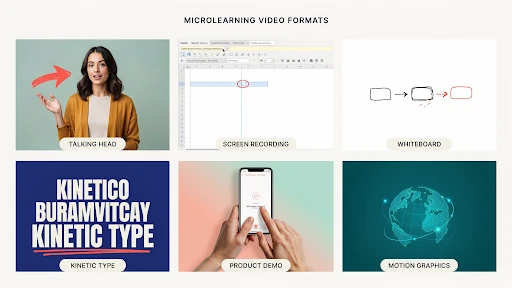
Table of Contents
A micro-learning short video should feel like the answer someone needed five minutes ago. Not a course. Not a lecture. Not a tiny webinar wearing a training badge. Just one useful thing, explained quickly enough that the viewer can remember it and use it.
That is where most teams mess it up.
They start with a simple idea, then add a brand intro, three learning goals, a policy reminder, a manager quote, and a closing slide nobody asked for. By the time the actual lesson starts, half the 60 seconds are gone.
Microlearning only works when it stays small.
Start Smaller Than Feels Comfortable
A 60-second video has no patience for “while we’re here.”
Pick one thing.
Not “how to handle customer complaints.” That is too big. Try “how to open your first reply to an angry customer.”
Not “how to use the CRM.” Too wide. Try “how to update a lead status after a call.”
Not “safety basics.” Too vague. Try “how to check the lock before starting the machine.”
That is the first rule of microlearning videos. The topic should be so specific that the video almost writes itself.
A team using explainer video services should expect this kind of trimming before production begins. The hard part is not always animation or editing. Sometimes the hard part is telling the client, “This is three videos, not one.”
Write the Learning Goal in Plain English
Before the script, write one sentence:
“After watching this, the person should be able to…”
If the sentence keeps growing, your topic is not ready.
For example:
“After watching this, the rep should know how to confirm the refund timeline.”
Good.
“After watching this, the rep should understand refund policy, customer tone, escalation steps, account notes, and manager approval.”
Too much.
That second version is a mini-course. It might be useful, but it is not a 60-second training video.
This is also the answer to how long microlearning videos should be. They should be as short as the lesson allows. Many sit between 30 and 60 seconds nicely. If the topic needs two minutes, split it.
Do Not Waste the Opening
The first line should get straight to the point.
Bad opening:
“Today we will discuss an important workplace communication skill that can help improve customer experience.”
Nobody talks like that. Nobody wants to hear it either.
Better:
“Before you reply to an angry customer, check the order history first.”
Now the viewer knows why they are watching.
Good short training videos do not warm up for too long. They start where the mistake happens, where the question comes up, or where the viewer usually gets stuck.
That tiny shift makes the video feel more useful right away.
Use a Real Moment From the Job
The best microlearning topics are already sitting inside the workday.
A new employee forgets to tag a ticket.
A sales rep skips the follow-up note.
A warehouse worker scans the wrong label.
A manager gives feedback that is too vague.
A customer support agent promises a refund date too early.
That is where good employee training videos come from. Not from broad training themes. From moments people actually repeat.
For microlearning video examples for employee training, think smaller than a course menu. A 45-second clip can teach how to greet a walk-in customer, how to confirm a delivery address, how to spot a phishing email, or how to end a sales call with a clear next step.
One scene. One mistake. One better action.
Keep the Script Slightly Messy in a Human Way

A training video script should sound spoken, not printed.
People do not talk in perfect policy sentences. They pause. They use shorter phrases. They explain things in the order they would actually say them.
For example:
“Open the customer profile first. Check the last order. Then reply. Do not guess from the email alone.”
That works better than:
“Representatives should verify customer account information prior to responding in order to ensure accuracy.”
The second one sounds like it came from a handbook. The first one sounds like a supervisor who knows the job.
For e-learning video content, that matters. The viewer is more likely to remember a line that sounds like something a real person would say.
Show the Action, Not Just the Rule
A rule is easy to ignore.
A shown action is easier to copy.
If the lesson is about logging a support note, show the note being added. If the lesson is about checking a safety lock, show the hand checking the lock. If the lesson is about choosing the right CRM tag, show the dropdown and the correct tag.
This is where instructional video production needs discipline. Fancy transitions will not save a vague lesson. The viewer should never wonder, “Okay, but what do I actually do?”
Show the action once. Explain why it matters. End with the reminder.
That is enough.
Use 2D When the Idea Needs to Feel Simple
Some topics are not exciting to film.
A customer journey. A compliance rule. A workflow handoff. A manager conversation. A refund process. A data privacy reminder.
That is where a 2D explainer video company can help. 2D animation can turn dry internal training into clean scenes with characters, icons, short labels, and simple motion.
It works well for bite-sized learning because it removes clutter. You can show only what matters. No messy office background. No awkward acting. No extra details pulling attention away from the lesson.
The style should stay simple. Microlearning does not need visual fireworks.
Save 3D for Topics That Need Space or Movement
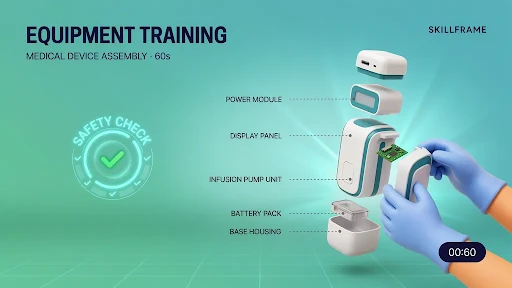
Some lessons need more depth than flat visuals can give.
Equipment training. Product assembly. Medical device handling. Safety checks. Machine parts. Technical hardware. Anything where shape, motion, angle, or internal parts matter.
That is when a 3D explainer video company makes sense.
A 3D training clip can show a part from the inside, slow down a movement, rotate the product, or highlight a dangerous contact point. That can be much clearer than filming the same thing with a camera, especially when the real action happens too fast or too small.
But do not force 3D onto a simple lesson. A password reset does not need dramatic depth.
SaaS Products Need Microlearning Inside the Flow
Software users rarely want to leave the product to learn the product.
They want help right where they are stuck.
That is why SaaS explainer video company support can be valuable for product teams. A SaaS brand may need short clips for onboarding, feature adoption, dashboard setup, billing steps, account permissions, or customer success emails.
The best clips feel placed, not dumped.
A 35-second video beside a setup step can beat a long help article. A quick feature clip inside the dashboard can stop a user from opening a support ticket. A short onboarding video can help someone reach the first useful action faster.
This is where short training videos for workplace learning and product education start to overlap.
Where These Videos Fit Best
Microlearning is useful when timing matters.
Use it inside onboarding portals, LMS modules, Slack or Teams channels, help centers, customer education emails, sales enablement libraries, product dashboards, HR refreshers, and safety reminders.
The closer the video sits to the task, the better.
A safety reminder helps more before the shift than three weeks earlier in a course. A CRM clip helps more next to the CRM task than buried inside a 20-page guide. A product tutorial helps more inside the dashboard than hidden in a support article.
The best format for micro learning short video is the one the viewer can find when they actually need it.
Final Words
A microlearning short video works when it respects the viewer’s time. Keep the topic narrow. Use real work moments. Write as a person speaks. Show the action clearly. Add captions.
Choose 2D, 3D, screen recording, or live footage based on what teaches the point fastest. Under 60 seconds, there is no space for filler. The best microlearning videos feel like quick help from someone who knows the job, not a compressed training module.
Related Articles:

evadmin
Expert contributor to the Explainer Video Company blog.