The Perfect Explainer Video Structure: Hook, Problem, Solution, & CTA
2026-06-11T16:20:27
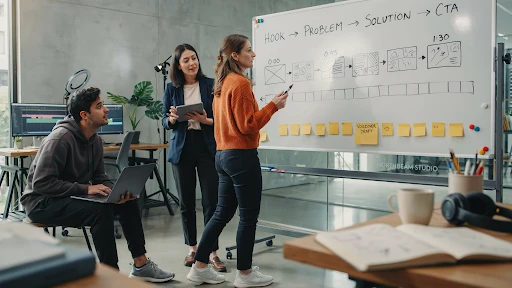
Table of Contents
An explainer video structure formula saves a video from turning into a moving brochure. That is the blunt version. Most weak explainers do not fail because the animation looks bad. They fail because the story wanders. The opening takes too long. The problem feels soft. The solution arrives late. The CTA sounds like it was pasted on in the last five seconds.
A good explainer does not need a complicated structure. It needs a clean path.
Hook.
Problem.
Solution.
Proof.
CTA.
That is usually enough.
Why Explainer Video Structure Matters
A viewer decides fast.
If the video does not make sense in the first few seconds, they are gone. Maybe not physically. They might still be watching. But mentally, they have checked out.
That is why explainer video structure matters more than people think. It gives the viewer a reason to keep following. One idea leads to the next. No random feature dump. No slow company intro. No “we are passionate about helping businesses” opener that could belong to any brand.
A strong explainer video script feels like someone is guiding the viewer through a problem they already recognize.
That is what makes the structure useful. It removes the guesswork.
The Explainer Video Structure Formula That Actually Works
The simplest explainer video structure formula looks like this:
Start with the hook.
Name the problem.
Show what happens if the problem stays.
Introduce the solution.
Explain how it works.
Show the outcome.
End with one clear action.
That may sound basic, but it works because it follows the viewer’s attention.
People do not care about your product first. They care about their own friction. Once you show that you understand the friction, they give you more attention. Then you earn the right to explain the solution.
That is the core of how to structure an explainer video without overloading it.
Step 1: Write a Hook That Sounds Like the Viewer’s Problem
The video hook has one job. Make the viewer feel, “This is about me.”
Do not open with your company name. Do not open with a vague industry statement. Do not open with a slow brand line that sounds nice but says nothing.
Open with tension.
For a SaaS product, it might be:
“Your team is still chasing updates across five tools.”
For a fintech app:
“Most people do not know where their money goes until it is already gone.”
For a healthcare platform:
“Patients forget instructions because the appointment moves too fast.”
That is a real hook. It starts where the viewer already feels the problem.
A company offering explainer video services should push clients toward that kind of opening. The first line has to earn attention, not decorate the video.
Step 2: Make the Problem Specific
The problem section is where many videos get weak.
They say things like:
“Managing your business can be challenging.”
Yes, but that means nothing. What part is challenging? Who feels it? What does it cost them?
A better problem is concrete.
“Your sales team spends Monday morning updating spreadsheets instead of following up with leads.”
That works because it has a real scene. You can picture it. You can feel the wasted time.
This is the heart of the problem solution framework. The problem should be sharp enough that the solution feels necessary. If the problem is vague, the product feels optional.
Step 3: Do Not Stay in the Problem Too Long
A little tension helps. Too much becomes annoying.
The viewer already knows the problem. They do not need 40 seconds of pain. They need enough to feel understood, then they need movement.
This is where video storytelling becomes practical. A good script does not sit in one mood for too long. It shifts.
Problem. Pressure. Relief.
That rhythm keeps the video moving.
In a 60-second explainer video, the problem might only take 10 to 15 seconds. In a 90-second video, maybe 20. If the product is complex, you can take slightly longer, but do not turn the video into a complaint.
Get to the solution before patience runs out.
Step 4: Introduce the Solution Without Overselling It

The solution should feel like the natural answer to the problem.
Bad version:
“That is why we created the most advanced platform for modern teams.”
Better version:
“That is why our platform brings every update, approval, and next step into one shared view.”
The second one explains what changes.
That matters.
When the solution enters, avoid the urge to sound huge. Most viewers do not need a dramatic reveal. They need a clear explanation.
If the video is for a technical product, a 3D explainer video company may use product cutaways, system visuals, or spatial animation to show what the solution does. But the script still needs restraint. Do not say everything the visuals already show.
Let the screen do some of the work.
Step 5: Explain How It Works in Three Beats
A good explainer usually needs three simple steps.
Not seven. Not twelve.
Three is enough for most videos.
For example:
Connect your tools.
Track every update in one place.
See what needs action before work gets stuck.
That is simple. It gives the viewer a mental path.
This is where a clear explainer video outline helps before production begins. If the team cannot explain the product in three beats, the video may need a narrower focus.
A 2D explainer video company can handle these steps with icons, character scenes, UI snippets, or simple motion graphics. The key is pacing. Each beat should feel useful, not rushed.
Step 6: Show the Outcome, Not Just the Feature
Viewers care about what changes.
A feature says:
“Automated reporting.”
An outcome says:
“You stop building the same report by hand every Friday.”
That is the difference.
A strong animated explainer video should show the viewer a better version of the situation. Less confusion. Faster setup. Fewer missed tasks. Easier decisions. Clearer customer communication.
This is especially important for the best explainer video structure for startups. Early-stage brands often want to explain everything because they are still proving themselves. That instinct is understandable, but it usually hurts the video.
Show the outcome clearly. Let the viewer feel the practical win.
Step 7: Add Proof Without Slowing the Video Down
Proof does not always mean a testimonial or a statistic.
It can be a quick product screen.
A short customer scenario.
A before-and-after moment.
A recognizable workflow.
A result the viewer can believe.
The point is to make the solution feel real.
For B2B products, especially software, the explainer video structure for SaaS products should include proof that the workflow actually makes sense. A clean UI moment can do more than a broad claim.
A SaaS explainer video company may build this proof through screen-based scenes, onboarding flows, dashboard moments, or role-based examples. The best SaaS videos do not just say the product is easy. They show the user getting through one important task.
Step 8: End With One CTA
The explainer video CTA should be clear and singular.
Do not ask viewers to book a demo, download a guide, follow the brand, visit three pages, and start a trial all at once. Pick one.
The CTA should match the stage of the viewer.
For a homepage video:
“Book a demo.”
For a product education video:
“Start with the setup guide.”
For a sales follow-up video:
“See the workflow in action.”
This is also where how to write a conversion-focused explainer video becomes simple. The CTA should feel like the next step after the story, not a sudden sales push.
If the video explained a problem well, the CTA does not need to beg.
Frequently Asked Questions
Final Words
The explainer video structure formula is not complicated, and that is why it works. Start with a hook that sounds like the viewer’s real problem. Make the problem specific. Introduce the solution at the right time. Explain how it works in a few clean beats. Show the outcome. End with one clear CTA.
That structure gives the video a spine. Without it, even good animation can feel scattered. With it, the message becomes easier to follow, easier to remember, and much easier to act on.
Related Articles:

evadmin
Expert contributor to the Explainer Video Company blog.